numpy#
import numpy as np
np.__version__
np.random.seed(0) # 设置随机数种子,确保每次之下生成同样的随机数组
#help(np.max)
help(np.isfinite)
Help on ufunc:

isfinite = <ufunc 'isfinite'>
    isfinite(x, /, out=None, *, where=True, casting='same_kind', order='K', dtype=None, subok=True[, signature, extobj])

    Test element-wise for finiteness (not infinity and not Not a Number).

    The result is returned as a boolean array.

    Parameters
    ----------
    x : array_like
        Input values.
    out : ndarray, None, or tuple of ndarray and None, optional
        A location into which the result is stored. If provided, it must have
        a shape that the inputs broadcast to. If not provided or None,
        a freshly-allocated array is returned. A tuple (possible only as a
        keyword argument) must have length equal to the number of outputs.
    where : array_like, optional
        This condition is broadcast over the input. At locations where the
        condition is True, the `out` array will be set to the ufunc result.
        Elsewhere, the `out` array will retain its original value.
        Note that if an uninitialized `out` array is created via the default
        ``out=None``, locations within it where the condition is False will
        remain uninitialized.
    **kwargs
        For other keyword-only arguments, see the
        :ref:`ufunc docs <ufuncs.kwargs>`.

    Returns
    -------
    y : ndarray, bool
        True where ``x`` is not positive infinity, negative infinity,
        or NaN; false otherwise.
        This is a scalar if `x` is a scalar.

    See Also
    --------
    isinf, isneginf, isposinf, isnan

    Notes
    -----
    Not a Number, positive infinity and negative infinity are considered
    to be non-finite.

    NumPy uses the IEEE Standard for Binary Floating-Point for Arithmetic
    (IEEE 754). This means that Not a Number is not equivalent to infinity.
    Also that positive infinity is not equivalent to negative infinity. But
    infinity is equivalent to positive infinity.  Errors result if the
    second argument is also supplied when `x` is a scalar input, or if
    first and second arguments have different shapes.

    Examples
    --------
    >>> np.isfinite(1)
    True
    >>> np.isfinite(0)
    True
    >>> np.isfinite(np.nan)
    False
    >>> np.isfinite(np.inf)
    False
    >>> np.isfinite(np.NINF)
    False
    >>> np.isfinite([np.log(-1.),1.,np.log(0)])
    array([False,  True, False])

    >>> x = np.array([-np.inf, 0., np.inf])
    >>> y = np.array([2, 2, 2])
    >>> np.isfinite(x, y)
    array([0, 1, 0])
    >>> y
    array([0, 1, 0])
构造上三角
np.triu(
    np.random.randn(3,3),
    k = 1
)
array([[ 0.        ,  0.40015721,  0.97873798],
       [ 0.        ,  0.        , -0.97727788],
       [ 0.        ,  0.        ,  0.        ]])
a = np.random.randn(3,3)
np.where(a > 0.3, 10, -1)
array([[10, -1, 10],
       [10, -1, 10],
       [10, 10, -1]])
a.flatten()
array([ 0.4105985 ,  0.14404357,  1.45427351,  0.76103773,  0.12167502,
        0.44386323,  0.33367433,  1.49407907, -0.20515826])
2.1 认识一下#
2.1.5 从头创建数组#
np.zeros(10, dtype = int)
array([0, 0, 0, 0, 0, 0, 0, 0, 0, 0])
np.ones((3,5))
array([[1., 1., 1., 1., 1.],
       [1., 1., 1., 1., 1.],
       [1., 1., 1., 1., 1.]])
np.full((3, 5), 3.14)
array([[3.14, 3.14, 3.14, 3.14, 3.14],
       [3.14, 3.14, 3.14, 3.14, 3.14],
       [3.14, 3.14, 3.14, 3.14, 3.14]])
np.arange(0, 20, 2)
array([ 0, 2, 4, 6, 8, 10, 12, 14, 16, 18])
np.arange(0, 20, 2).reshape(5,2)
array([[ 0,  2],
       [ 4,  6],
       [ 8, 10],
       [12, 14],
       [16, 18]])
np.linspace(0, 1, 5)
array([0. , 0.25, 0.5 , 0.75, 1. ])
np.linspace(0,1) # 默认50个
array([0.        , 0.02040816, 0.04081633, 0.06122449, 0.08163265,
       0.10204082, 0.12244898, 0.14285714, 0.16326531, 0.18367347,
       0.20408163, 0.2244898 , 0.24489796, 0.26530612, 0.28571429,
       0.30612245, 0.32653061, 0.34693878, 0.36734694, 0.3877551 ,
       0.40816327, 0.42857143, 0.44897959, 0.46938776, 0.48979592,
       0.51020408, 0.53061224, 0.55102041, 0.57142857, 0.59183673,
       0.6122449 , 0.63265306, 0.65306122, 0.67346939, 0.69387755,
       0.71428571, 0.73469388, 0.75510204, 0.7755102 , 0.79591837,
       0.81632653, 0.83673469, 0.85714286, 0.87755102, 0.89795918,
       0.91836735, 0.93877551, 0.95918367, 0.97959184, 1.        ])
np.random.random((3,3))
array([[0.5488135 , 0.71518937, 0.60276338],
       [0.54488318, 0.4236548 , 0.64589411],
       [0.43758721, 0.891773  , 0.96366276]])
np.random.rand(3,3)
array([[0.79172504, 0.52889492, 0.56804456],
       [0.92559664, 0.07103606, 0.0871293 ],
       [0.0202184 , 0.83261985, 0.77815675]])
np.random.normal(0, 1, size=(3,3)) # 均值0方差1的标准正态分布
array([[-0.65453533, -0.81100072, -0.24174969],
       [ 0.4552344 , -0.87611752,  0.98558778],
       [ 1.11227937,  1.05456625,  1.99581551]])
np.random.randint(0, 10, (3,3)) # 0-10的随机数
array([[9, 5, 5],
       [7, 2, 0],
       [9, 1, 6]], dtype=int32)
np.eye(3) # 3*3单位矩阵
array([[1., 0., 0.],
       [0., 1., 0.],
       [0., 0., 1.]])
np.empty((3,3)) # 空数组,值不确定
array([[1., 0., 0.],
       [0., 1., 0.],
       [0., 0., 1.]])
np.diag([1,2,3]) #
array([[1, 0, 0],
       [0, 2, 0],
       [0, 0, 3]])
np.diag([1,2,3] , k=-1) # k表示对角线上下偏移
array([[0, 0, 0, 0],
       [1, 0, 0, 0],
       [0, 2, 0, 0],
       [0, 0, 3, 0]])
对数尺度上均匀分布,默认10为底, 比如 10e-10, 10e-9。。。
np.logspace(-10, 10, 20)
array([1.00000000e-10, 1.12883789e-09, 1.27427499e-08, 1.43844989e-07,
       1.62377674e-06, 1.83298071e-05, 2.06913808e-04, 2.33572147e-03,
       2.63665090e-02, 2.97635144e-01, 3.35981829e+00, 3.79269019e+01,
       4.28133240e+02, 4.83293024e+03, 5.45559478e+04, 6.15848211e+05,
       6.95192796e+06, 7.84759970e+07, 8.85866790e+08, 1.00000000e+10])
2.1.6 np.nan#
表示缺失或者未定义。
是一个特殊浮点
任何设计nan运算都是nan(false)
isnan检查数组NaN
type(np.nan)
float
print(np.nan == np.nan)
False
arr = np.array([0, np.nan, 1])
np.isnan(arr)
array([False, True, False])
基础处理nan
np.nan_to_num(arr)
array([0., 0., 1.])
nan友好函数,即忽略nan进行计算
np.nansum(arr)
np.float64(1.0)
2.1.7 np.inf#
2.2 numpy数组基础#
数组的属性:确定数组的大小、形状、存储大小、数据类型。
数组的索引:获取和设置数组各个元素的值。
数组的切分:在大的数组中获取或设置更小的子数组。
数组的变形:改变给定数组的形状。
数组的拼接和分裂:将多个数组合并为一个,以及将一个数组分裂成多个。
2.2.1 NumPy数组的属性#
x1 = np.random.randint(10, size = 6)
x2 = np.random.randint(10, size = (3, 4)) # 二维数组
x3 = np.random.randint(10, size = (3, 4, 5)) # 三维数组
print("x3 ndim : ", x3.ndim) # 数组维度
print("x3 shape : ", x3.shape) # 数组形状
print("x3 size : ", x3.size) # 数组总共的size
print("x3 dtype : ", x3.dtype) # 数组元素类型
print("x3 itemsize : ", x3.itemsize, "bytes") # 数组每元素 字节数
print("x3 nbytes : ", x3.nbytes, "bytes") # 数组总 字节数
x3 ndim :  3
x3 shape :  (3, 4, 5)
x3 size :  60
x3 dtype :  int32
x3 itemsize :  4 bytes
x3 nbytes :  240 bytes
2.2.2 数组索引#
x1
array([5, 0, 3, 3, 7, 9], dtype=int32)
x1[0]
np.int32(5)
x1[-1]
np.int32(9)
多维数组中通过 逗号分割的索引元组
x2[0, 0]
np.int32(3)
x2[0, 0] = 12
x2
array([[12,  5,  2,  4],
       [ 7,  6,  8,  8],
       [ 1,  6,  7,  7]], dtype=int32)
注意!! np数组类型是固定的!!! 所以如果修改其他元素类型 会强制转换
x2[0, 0] = 3.14
x2
---------------------------------------------------------------------------
NameError                                 Traceback (most recent call last)
Cell In[31], line 1
----> 1 x2[0, 0] = 3.14
      2 x2

NameError: name 'x2' is not defined
找到扁平化索引对应的原来索引
shape = (6,7,8)
index = 99 # find flat
x = index // (shape[1] * shape[2])
y = (index % (shape[1] * shape[2])) // shape[2]
z = index % shape[2]
print(f"Index of the 100th element (0-based) is: ({x}, {y}, {z})")
2.2.3 数组切片:获取子数组#
x[start:stop:step]
右开
默认值为0, 维度大小, 1
x = np.arange(10)
x
array([0, 1, 2, 3, 4, 5, 6, 7, 8, 9])
x[:-1]
array([0, 1, 2, 3, 4, 5, 6, 7, 8])
x[: 5]
array([0, 1, 2, 3, 4])
x[5: ]
array([5, 6, 7, 8, 9])
x[4: 7]
array([4, 5, 6])
x[: : 2]
array([0, 2, 4, 6, 8])
x[1: : 2]
array([1, 3, 5, 7, 9])
x[: : -1]
array([9, 8, 7, 6, 5, 4, 3, 2, 1, 0])
x[5: : -2]
array([5, 3, 1])
多维
x2
array([[3, 5, 2, 4],
       [7, 6, 8, 8],
       [1, 6, 7, 7]], dtype=int32)
x2[:2 , :3] # 前两行, 前三列
array([[3, 5, 2],
       [7, 6, 8]], dtype=int32)
x2[:3, : : 2] # 前三行, 列隔2
array([[3, 2],
       [7, 8],
       [1, 7]], dtype=int32)
x2[: : -1, : : -1] # 翻转行 列
array([[7, 7, 6, 1],
       [8, 8, 6, 7],
       [4, 2, 5, 3]], dtype=int32)
获取数组单行 单列
通过 空切片和索引
: 表示空切片,
x2[:, 0] # 第一列: 行空切片保留,列索引获取
array([3, 7, 1], dtype=int32)
x2[0, :] # 第一行
array([3, 5, 2, 4], dtype=int32)
x2[0] # 行做法
array([3, 5, 2, 4], dtype=int32)
np数组切片返回的是数组数据的视图
,不是副本, 即会修改元数据,与python列表切片不同
x2
array([[3, 5, 2, 4],
       [7, 6, 8, 8],
       [1, 6, 7, 7]], dtype=int32)
x2_sub = x2[:2, :2]
x2_sub[0, 0] = 99
x2_sub
array([[99,  5],
       [ 7,  6]], dtype=int32)
x2
array([[99,  5,  2,  4],
       [ 7,  6,  8,  8],
       [ 1,  6,  7,  7]], dtype=int32)
copy明确复制创建副本
x2_sub_copy = x2[:2, :2].copy()
x2_sub_copy[0, 0] = 22
x2_sub_copy # 是副本,所以原数组不变
array([[22,  5],
       [ 7,  6]], dtype=int32)
x2
array([[99,  5,  2,  4],
       [ 7,  6,  8,  8],
       [ 1,  6,  7,  7]], dtype=int32)
2.2.4 数组变形#
reshape
newaxis
import numpy as np
x = np.array([1,2,3])
x.reshape((1,3))
array([[1, 2, 3]])
x[np.newaxis, :] # newaxis转化为行向量
array([[1, 2, 3]])
x[:, np.newaxis] # newaxis转化为列向量
array([[1],
       [2],
       [3]])
x = np.arange(0, 20, 2).reshape(5,2)
x
array([[ 0,  2],
       [ 4,  6],
       [ 8, 10],
       [12, 14],
       [16, 18]])
扁平化
如果只想变成一维,不修改数据 → ravel()(更快)
如果需要独立副本,确保不影响原数组 → flatten()(更安全)
x.ravel()
array([ 0, 2, 4, 6, 8, 10, 12, 14, 16, 18])
x.flatten()
array([ 0, 2, 4, 6, 8, 10, 12, 14, 16, 18])
2.2.5 数组拼接分裂#
1. 数组拼接#
x = np.array([1, 2, 3])
y = np.array([2, 3, 5])
z = np.array([2, 1, 9])
np.concatenate([x, y, z])
array([1, 2, 3, 2, 3, 5, 2, 1, 9])
grid = np.array([
    [1, 2, 3],
    [4, 5, 6]
])
np.concatenate([grid, grid]) # 行拼接
np.vstack([grid, grid])

np.concatenate([grid, grid], axis = 1) # 列拼接
np.hstack([grid, grid])
array([[1, 2, 3, 1, 2, 3],
       [4, 5, 6, 4, 5, 6]])
# 网格点
x = np.linspace(-1, 1, 5)
y = np.linspace(-1, 1, 5)
x, y = np.meshgrid(x, y)
points = np.dstack((x, y))
points[1, 0]
array([-1. , -0.5])
2. 数组分裂#
x = np.array([i for i in range(5)])
x1, x2, x3 = np.split(x, [1, 3]) # 2个分裂点产生3个数组

grid = np.arange(16).reshape((4,4))
g1, g2 = np.vsplit(grid, [2])
g2
array([[ 8,  9, 10, 11],
       [12, 13, 14, 15]])
数组重复
arr = np.arange(9).reshape(3,3)
tiled = np.tile(arr, (2,3)) # 行方向重复两次, 列方向重复3次
tiled
array([[0, 1, 2, 0, 1, 2, 0, 1, 2],
       [3, 4, 5, 3, 4, 5, 3, 4, 5],
       [6, 7, 8, 6, 7, 8, 6, 7, 8],
       [0, 1, 2, 0, 1, 2, 0, 1, 2],
       [3, 4, 5, 3, 4, 5, 3, 4, 5],
       [6, 7, 8, 6, 7, 8, 6, 7, 8]])
2.3 numpy数组计算 函数#
axis = 0 表示跨行计算。 即按列计算。 如 mean, sum, std
2.3.1 缓慢循环#
def compute_reciprocals(values):
    output = np.empty(len(values))
    for i in range(len(values)):
        output[i] = 1.0 / values[i]
    return output

values = np.random.randint(1, 100, size = 1000000)
%timeit compute_reciprocals(values)
%timeit 1.0 / values
5.85 ms ± 45.9 μs per loop (mean ± std. dev. of 7 runs, 100 loops each)
2.3.2 通用函数(np 快速函数)#
import numpy as np
np.arange(5) / np.arange(1, 6)
x = np.arange(9).reshape((3,3))
2 ** x
np.sin(x)
array([[ 0.        ,  0.84147098,  0.90929743],
       [ 0.14112001, -0.7568025 , -0.95892427],
       [-0.2794155 ,  0.6569866 ,  0.98935825]])
data = [1, 2, 3, 4, 5, 6, 7, 8, 9, 10]
percentiles = np.percentile(data, [25, 50, 75]) # 分位数
print(percentiles)  # 输出: [3.25, 5.5, 7.75]
[3.25 5.5 7.75]
data = np.array([[1, 2, 3], [4, 5, 6]])
p50 = np.percentile(data, 50, axis=0)  # 按列计算中位数
print(p50)  # 输出: [2.5, 3.5, 4.5]
[2.5 3.5 4.5]
高阶数学计算#
from scipy import special
# 误差函数(高斯积分)
# 它的实现和它的逆实现
x = np.array([0, 0.3, 0.7, 1.0])
print("erf(x) =", special.erf(x))
print("erfc(x) =", special.erfc(x))
print("erfinv(x) =", special.erfinv(x))
---------------------------------------------------------------------------
NameError                                 Traceback (most recent call last)
Cell In[14], line 4
      1 # 误差函数(高斯积分)
      2 # 它的实现和它的逆实现
      3 x = np.array([0, 0.3, 0.7, 1.0])
----> 4 print("erf(x) =", special.erf(x))
      5 print("erfc(x) =", special.erfc(x))
      6 print("erfinv(x) =", special.erfinv(x))

NameError: name 'special' is not defined
最大
x=[1,2,3]
y=[2,3,5]
z= np.random.randn(2,3)
np.maximum(x, y)	#逐元素 取最大值(两个数组 对应位置比较)
np.max(x)	#整体 取最大值(整个数组 或指定 axis)
np.max(z)
np.float64(1.585061536053887)
2.3.4 通用函数特性#
指定输出:运算需要临时一个数组存放。所有通用函数都支持的。
聚合结果。
reduce对元素执行重复操作
accumulate存储中间计算结果计算
外积:outer
x =  np.arange(5)
y = np.empty(5)
np.multiply(x, 10, out = y)
print(y)
[ 0. 10. 20. 30. 40.]
x = np.arange(1, 6)
np.add.reduce(x)
np.multiply.reduce(x)

np.add.accumulate(x)
np.multiply.accumulate(x)
array([ 1, 2, 6, 24, 120])
np.multiply.outer(x, x)
array([[ 1,  2,  3,  4,  5],
       [ 2,  4,  6,  8, 10],
       [ 3,  6,  9, 12, 15],
       [ 4,  8, 12, 16, 20],
       [ 5, 10, 15, 20, 25]])
2.3.5 统计#
import numpy as np
x = np.random.randn(3)
y = np.random.randn(3)
print(corr_func(x, y))
2.4 聚合最大最小#
之前提到通用函数会比内置快.
x = np.random.random(10)
sum(x) # py内置
np.sum(x) #
x.sum() # 两种都行

min(x)
np.min(x)
x.min()
np.float64(0.24617237210136012)
2.5 数组的计算:广播#
np通用函数通过向量化操作减少缓慢的python循环
广播通过向量化操作实现不同大小数组的快速计算
x = np.arange(5)
x + 5
x = np.zeros((2,5))
x + 5
np.ones((3, 3)) + np.arange(3)
np.ones((3, 1)) + np.arange(3)
array([[1., 2., 3.],
       [1., 2., 3.],
       [1., 2., 3.]])

2.5.2 广播规则#
规则1:如果两个数组的维度数不相同,那么小维度数组的形状将会在最左边补1。
规则2:如果两个数组的形状在任何一个维度上都不匹配,那么数组的形状会沿着维度 为1 的维度扩展以匹配另外一个数组的形状。
规则3:如果两个数组的形状在任何一个维度上都不匹配并且没有任何一个维度等于1, 那么会引发异常
案例1
a. (3,) 维度数少。 -> (1,3)
b. 在第一维度不匹配。 -> (2,3)
c. so,结果是(2,3)
M = np.ones((2, 3))
x = np.arange(3)
M.shape # (2,3)
x.shape # (3,)
M + x
array([[1., 2., 3.],
       [1., 2., 3.]])
案例2
a. 补全b维度, (1,3)
b. 匹配维度,(3,3)
a = np.arange(3).reshape((3, 1))
b = np.arange(3)
a.shape # (3,1)
b.shape # (3,)
a + b
array([[0, 1, 2],
       [1, 2, 3],
       [2, 3, 4]])
2.5.3 广播应用#
数组归一化
x = np.random.random((10, 3))
xm = np.mean(x, 0) # 0表示行聚合, 值为每个特征的平均值
x - xm
array([[ 0.28746899,  0.39055001,  0.06960613],
       [-0.28358642, -0.08141981,  0.4679283 ],
       [ 0.0530289 ,  0.17565128,  0.44597887],
       [ 0.09055865, -0.49952404, -0.3820369 ],
       [-0.42046329, -0.18245713, -0.3536573 ],
       [-0.28336433,  0.12060247, -0.4098298 ],
       [ 0.09150787, -0.09616353, -0.30112625],
       [ 0.40635463,  0.13742707,  0.55295189],
       [-0.09120414, -0.11714309,  0.20782362],
       [ 0.14969915,  0.15247675, -0.29763855]])
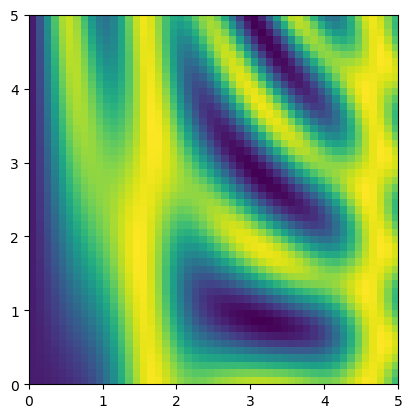
绘制二维函数
x = np.linspace(0, 5, 50)
y = np.linspace(0, 5, 50)[:, np.newaxis]
z = np.sin(x) ** 10 + np.cos(10 + y * x) * np.cos(x)
z.shape
(50, 50)
import matplotlib.pyplot as plt
plt.imshow(z, origin='lower', extent = [0, 5, 0, 5], cmap = 'viridis')
<matplotlib.image.AxesImage at 0x25f91bd3680>
2.6 比较、掩码和布尔逻辑#
需要统计筛选,条件删除等操作时候
import pandas as pd
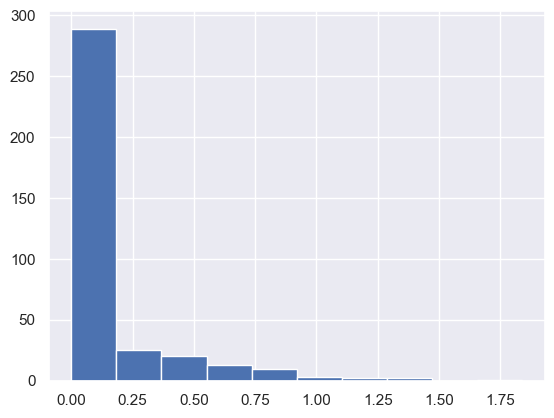
rainfall = pd.read_csv('Seattle2014.csv')['PRCP'].values
inches = rainfall / 254
inches.shape
(365,)
import matplotlib.pyplot as plt
import seaborn
seaborn.set()
plt.hist(inches)
(array([289.,  25.,  20.,  13.,  10.,   3.,   2.,   2.,   0.,   1.]),
 array([0.        , 0.18385827, 0.36771654, 0.5515748 , 0.73543307,
        0.91929134, 1.10314961, 1.28700787, 1.47086614, 1.65472441,
        1.83858268]),
 <BarContainer object of 10 artists>)
2.6.2 比较通用函数#
结果是bool数据类型数组
使用运算符时候,np内部会转为通用函数
x = np.arange(6)
x < 3
(x * 2) == (x ** 2)
np.less(x, 3) #
array([ True, True, True, False, False, False])
x = np.random.randint(10, size = (3, 4))
x < 3
array([[ True, False, False, False],
       [False, False, False,  True],
       [False, False,  True, False]])
2.6.3 bool数组用处#
条件统计个数
x = np.arange(6)
arr = np.array([1, 2, 0, 0, 4, 0])
indices = np.nonzero(arr) # 返回非0值的索引
indices
(array([0, 1, 4]),)
np.count_nonzero(x < 6)
6
np.sum(x < 6)
np.int64(6)
np.sum(x < 6, axis = 0)
np.int64(6)
np.any(x <8 )
np.all(x > 0)
np.False_
print("Number days without rain: ", np.sum(inches == 0))
print("Number days with rain: ", np.sum(inches != 0))
print("Days with more than 0.5 inches:", np.sum(inches > 0.5))
print("Rainy days with < 0.1 inches :", np.sum((inches > 0) & (inches < 0.2)))
Number days without rain:  215
Number days with rain:  150
Days with more than 0.5 inches: 37
Rainy days with < 0.1 inches : 75
2.6.4 将布尔数组作为掩码 ,筛选子集#
掩码操作返回的是一维数组!
x = np.random.randint(10, size = (3,3))
x < 5
x[x<5]
array([0, 1, 2], dtype=int32)
2.7 花哨的索引#
花哨索引传递的是索引数组,而不是单个标量。 因此能够快速获取子集
结果与索引数组形状一样
x = np.arange(6)
ind = [1,2,3]
x[ind]
array([1, 2, 3])
ind = np.array([
    [1,2],
    [2,3]
])
x[ind]
array([[1, 2],
       [2, 3]])
x = np.arange(12).reshape((3,4))
row_ind = np.array([1,2])
col_ind = np.array([0,3])
x[row_ind, col_ind] # (1,0), (2,3) 位置
array([ 4, 11])
x[row_ind[:, np.newaxis], col_ind] # 索引数组形状不匹配,需要广播规则先匹配
array([[ 4,  7],
       [ 8, 11]])
2.7.2 组合索引#
x = np.arange(12).reshape((3,4))
x
array([[ 0,  1,  2,  3],
       [ 4,  5,  6,  7],
       [ 8,  9, 10, 11]])
x[2, [2,0,1]]
array([10, 8, 9])
x[1:, [2,0,1]]
array([[ 6,  4,  5],
       [10,  8,  9]])
2.7.3 示例:选择随机点 .#
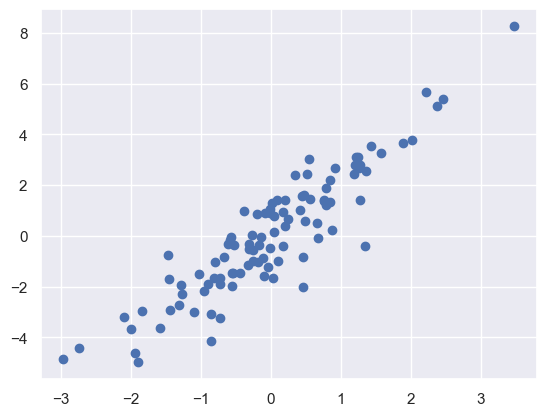
场景:从矩阵随机选择行
mean = [0,0]
cov = [[1,2], [2,5]]
x = np.random.multivariate_normal(mean, cov, 100)
x.shape
(100, 2)
import matplotlib.pyplot as plt
import seaborn; seaborn.set() # 设置绘图风格
plt.scatter(x[:,0], x[:,1])
<matplotlib.collections.PathCollection at 0x25f9adcba10>
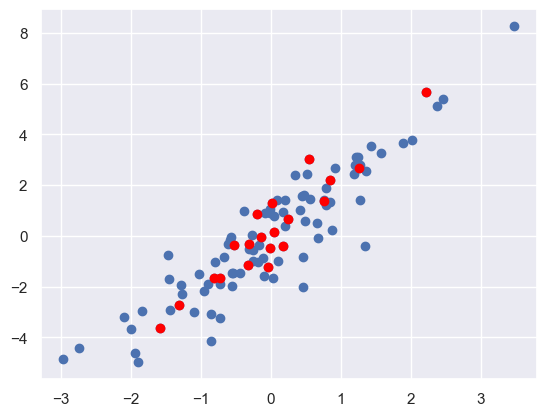
indices = np.random.choice(x.shape[0], 20, replace=False)
selection = x[indices]
plt.scatter(x[:,0], x[:,1])
plt.scatter(selection[:,0], selection[:, 1], facecolor = 'red')
<matplotlib.collections.PathCollection at 0x25f9b1f3680>
2.7.4 用花哨的索引修改部分数组#
x = np.arange(10)
x
array([0, 1, 2, 3, 4, 5, 6, 7, 8, 9])
ind = np.array([2,1,8,4])
x[ind] = 99
x
array([ 0, 99, 99, 3, 99, 5, 6, 7, 99, 9])
np.add.at(x, ind, 1) # 原地操作, 对索引处加1
x
array([ 0, 102, 102, 3, 102, 5, 6, 7, 102, 9])
2.7.5 示例:数据区间划分#
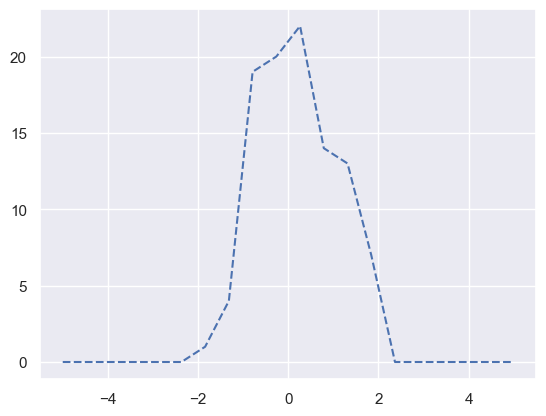
手动计算直方图分布
x = np.random.randn(100)
x.shape
(100,)
bins = np.linspace(-5, 5, 20)
counts = np.zeros_like(bins) # 创建形状相同的全0数组

i = np.searchsorted(bins, x) # 查找一个元素在已排序数组中的插入位置
np.add.at(counts, i, 1)
counts
array([ 0.,  0.,  0.,  0.,  0.,  0.,  1.,  4., 19., 20., 22., 14., 13.,
        7.,  0.,  0.,  0.,  0.,  0.,  0.])
plt.plot(bins, counts, linestyle = '--')
[<matplotlib.lines.Line2D at 0x25f9ad6bbc0>]
2.8 数组的排序#
x = np.array([2, 1, 4, 3, 5])
x
array([2, 1, 4, 3, 5])
np.sort(x) # 非原地
x.sort() # 原地排序
x
array([1, 2, 3, 4, 5])
x = np.array([2, 1, 4, 3, 5])
np.argsort(x) # 返回的是对应的索引数组
array([1, 0, 3, 2, 4])
多维数组,axis沿着行列排序#
x = np.random.randint(10, size=(4,6))
x
array([[0, 1, 3, 1, 8, 4],
       [2, 1, 8, 4, 6, 3],
       [2, 8, 0, 1, 8, 4],
       [2, 8, 7, 3, 4, 3]], dtype=int32)
np.sort(x, axis=0) # 对每一列排序
array([[0, 1, 0, 1, 4, 3],
       [2, 1, 3, 1, 6, 3],
       [2, 8, 7, 3, 8, 4],
       [2, 8, 8, 4, 8, 4]], dtype=int32)
np.sort(x, axis=1) #对每一行排序,
array([[0, 1, 1, 3, 4, 8],
       [1, 2, 3, 4, 6, 8],
       [0, 1, 2, 4, 8, 8],
       [2, 3, 3, 4, 7, 8]], dtype=int32)
2.8.2 部分排序:分隔#
场景:不需要整个排序,而是找到第K小的值。
np.partition(x, k) 前k小的值按序排在前面k个位置
x = np.array([2, 4, 3, 9, 6, 5, 4])
x
array([2, 4, 3, 9, 6, 5, 4])
np.partition(x, 5)
array([2, 3, 4, 4, 5, 6, 9])
x = np.random.randint(10, size=(4,6))
np.partition(x, 2, axis=1) # axis1行内操作
array([[3, 3, 5, 6, 9, 9],
       [0, 3, 4, 5, 6, 8],
       [2, 4, 4, 6, 7, 9],
       [0, 1, 1, 3, 4, 6]], dtype=int32)
2.8.3 示例:K个最近邻#
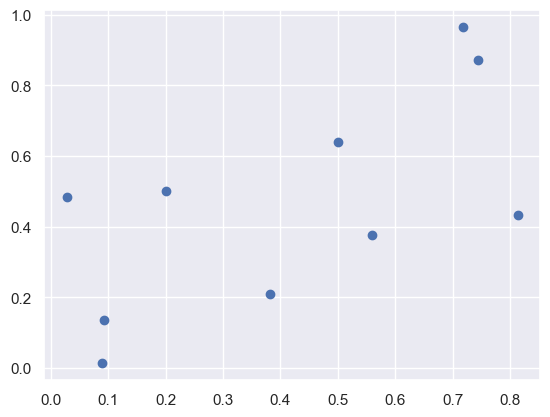
快速找到一个点的k近邻
x = np.random.rand(10,2)
x
array([[0.71794584, 0.96522075],
       [0.08970508, 0.0141406 ],
       [0.74454675, 0.87301855],
       [0.50080051, 0.64035131],
       [0.09262789, 0.13543144],
       [0.81374851, 0.43364737],
       [0.2016323 , 0.5009637 ],
       [0.02829625, 0.48445052],
       [0.55959898, 0.37555239],
       [0.38208126, 0.20930041]])
import matplotlib.pyplot as plt
import seaborn; seaborn.set() # 设置绘图风格
plt.scatter(x[:, 0], x[:, 1])
<matplotlib.collections.PathCollection at 0x25f9ad0d040>
x[:, np.newaxis, :].shape
(10, 1, 2)
x[np.newaxis,:,:].shape
(1, 10, 2)


#  > differences[i,j] 表示样本距离:是一个n维向量
differences = x[:, np.newaxis, :] - x[np.newaxis,:,:]
sq_differences = differences ** 2
dist_sq = sq_differences.sum(-1)
dist_sq
array([[0.        , 1.29923992, 0.00920885, 0.15269225, 1.07957284,
        0.29174841, 0.48211429, 0.70675659, 0.37278251, 0.68422058],
       [1.29923992, 0.        , 1.16648895, 0.56113931, 0.01472001,
        0.70022482, 0.24952443, 0.22496247, 0.35141876, 0.12357118],
       [0.00920885, 1.16648895, 0.        , 0.11354627, 0.96903294,
        0.19783592, 0.43318091, 0.6639999 , 0.28167826, 0.571903  ],
       [0.15269225, 0.56113931, 0.11354627, 0.        , 0.42154896,
        0.14066297, 0.10893053, 0.24756534, 0.07357573, 0.19989914],
       [1.07957284, 0.01472001, 0.96903294, 0.42154896, 0.        ,
        0.60894768, 0.14549579, 0.12595287, 0.27572006, 0.08923987],
       [0.29174841, 0.70022482, 0.19783592, 0.14066297, 0.60894768,
        0.        , 0.37921774, 0.61951622, 0.06796701, 0.23666818],
       [0.48211429, 0.24952443, 0.43318091, 0.10893053, 0.14549579,
        0.37921774, 0.        , 0.03031807, 0.14386814, 0.1176293 ],
       [0.70675659, 0.22496247, 0.6639999 , 0.24756534, 0.12595287,
        0.61951622, 0.03031807, 0.        , 0.2941414 , 0.20087141],
       [0.37278251, 0.35141876, 0.28167826, 0.07357573, 0.27572006,
        0.06796701, 0.14386814, 0.2941414 , 0.        , 0.05915226],
       [0.68422058, 0.12357118, 0.571903  , 0.19989914, 0.08923987,
        0.23666818, 0.1176293 , 0.20087141, 0.05915226, 0.        ]])
有了每个点的距离后,就可以行内排序,每一行主机增大,表示距离增加. 如果用argsort显示索引,就得到了距离远近的点
nearest = np.argsort(dist_sq, axis = 1)
nearest
array([[0, 2, 3, 5, 8, 6, 9, 7, 4, 1],
       [1, 4, 9, 7, 6, 8, 3, 5, 2, 0],
       [2, 0, 3, 5, 8, 6, 9, 7, 4, 1],
       [3, 8, 6, 2, 5, 0, 9, 7, 4, 1],
       [4, 1, 9, 7, 6, 8, 3, 5, 2, 0],
       [5, 8, 3, 2, 9, 0, 6, 4, 7, 1],
       [6, 7, 3, 9, 8, 4, 1, 5, 2, 0],
       [7, 6, 4, 9, 1, 3, 8, 5, 2, 0],
       [8, 9, 5, 3, 6, 4, 2, 7, 1, 0],
       [9, 8, 4, 6, 1, 3, 7, 5, 2, 0]])
如果只需要k近邻,只需要argpartition
nearest_k = np.argpartition(dist_sq, 2, axis=1)
nearest_k
array([[0, 2, 3, 5, 8, 6, 9, 7, 4, 1],
       [1, 4, 9, 7, 6, 8, 3, 5, 2, 0],
       [2, 0, 3, 5, 8, 6, 9, 7, 4, 1],
       [3, 8, 6, 2, 5, 0, 9, 7, 4, 1],
       [4, 1, 9, 7, 6, 8, 3, 5, 2, 0],
       [5, 8, 3, 2, 9, 0, 6, 4, 7, 1],
       [6, 7, 3, 9, 8, 4, 1, 5, 2, 0],
       [7, 6, 4, 9, 1, 3, 8, 5, 2, 0],
       [8, 9, 5, 3, 6, 4, 2, 7, 1, 0],
       [9, 8, 4, 6, 1, 3, 7, 5, 2, 0]])
2.9 结构化数据:NumPy的结构化数组#
组织异构数据
自定义dtype类型
可以通过索引访问数据
x = np.zeros(4, dtype = {'names':('name', 'age', 'weight'),
                    'formats':('U10', 'i4', 'f8')})
x.dtype
dtype([('name', '<U10'), ('age', '<i4'), ('weight', '<f8')])
# 从数组创建 ,默认创建
np.dtype('S10, i4, f8')
np.dtype([('r', 'u1'), ('g', 'u1'), ('b', 'u1'), ('a', 'u1')])
dtype([('r', 'u1'), ('g', 'u1'), ('b', 'u1'), ('a', 'u1')])
name = ['Alice', 'Bob', 'Cathy', 'Doug']
age = [25, 45, 37, 19]
weight = [55.0, 85.5, 68.0, 61.5]
x['name'] = name
x['age'] = age
x['weight'] = weight
x
array([('Alice', 25, 55. ), ('Bob', 45, 85.5), ('Cathy', 37, 68. ),
       ('Doug', 19, 61.5)],
      dtype=[('name', '<U10'), ('age', '<i4'), ('weight', '<f8')])
x[-1]
x['name']
array(['Alice', 'Bob', 'Cathy', 'Doug'], dtype='<U10')
x[x['age'] > 14]['name']
array(['Alice', 'Bob', 'Cathy', 'Doug'], dtype='<U10')
color_dt = np.dtype([
    ('r', np.ubyte),
    ('g', np.ubyte),
    ('b', np.ubyte),
    ('a', np.ubyte),
])
自定义了一种颜色类型: 4个字节
data = np.zeros((2,2), dtype=color_dt)
data[0,0 ]= (255,0,0,255)
data[0,1]= (155,10,10,155)
可以快速访问各颜色通道
data['g']
array([[ 0, 10],
       [ 0,  0]], dtype=uint8)
2.10 random#
import numpy as np
np.random.randn() # 标准正态分布
np.random.rand() # 均匀分布
0.21463681054178652
rng.randn(10, 2)
array([[-2.55298982,  0.6536186 ],
       [ 0.8644362 , -0.74216502],
       [ 2.26975462, -1.45436567],
       [ 0.04575852, -0.18718385],
       [ 1.53277921,  1.46935877],
       [ 0.15494743,  0.37816252],
       [-0.88778575, -1.98079647],
       [-0.34791215,  0.15634897],
       [ 1.23029068,  1.20237985],
       [-0.38732682, -0.30230275]])
rng.normal(size = 100)
array([-1.70627019,  1.9507754 , -0.50965218, -0.4380743 , -1.25279536,
        0.77749036, -1.61389785, -0.21274028, -0.89546656,  0.3869025 ,
       -0.51080514, -1.18063218, -0.02818223,  0.42833187,  0.06651722,
        0.3024719 , -0.63432209, -0.36274117, -0.67246045, -0.35955316,
       -0.81314628, -1.7262826 ,  0.17742614, -0.40178094, -1.63019835,
        0.46278226, -0.90729836,  0.0519454 ,  0.72909056,  0.12898291,
        1.13940068, -1.23482582,  0.40234164, -0.68481009, -0.87079715,
       -0.57884966, -0.31155253,  0.05616534, -1.16514984,  0.90082649,
        0.46566244, -1.53624369,  1.48825219,  1.89588918,  1.17877957,
       -0.17992484, -1.07075262,  1.05445173, -0.40317695,  1.22244507,
        0.20827498,  0.97663904,  0.3563664 ,  0.70657317,  0.01050002,
        1.78587049,  0.12691209,  0.40198936,  1.8831507 , -1.34775906,
       -1.270485  ,  0.96939671, -1.17312341,  1.94362119, -0.41361898,
       -0.74745481,  1.92294203,  1.48051479,  1.86755896,  0.90604466,
       -0.86122569,  1.91006495, -0.26800337,  0.8024564 ,  0.94725197,
       -0.15501009,  0.61407937,  0.92220667,  0.37642553, -1.09940079,
        0.29823817,  1.3263859 , -0.69456786, -0.14963454, -0.43515355,
        1.84926373,  0.67229476,  0.40746184, -0.76991607,  0.53924919,
       -0.67433266,  0.03183056, -0.63584608,  0.67643329,  0.57659082,
       -0.20829876,  0.39600671, -1.09306151, -1.49125759,  0.4393917 ])
rng = np.random.RandomState(0)
2.11 网格化数组#
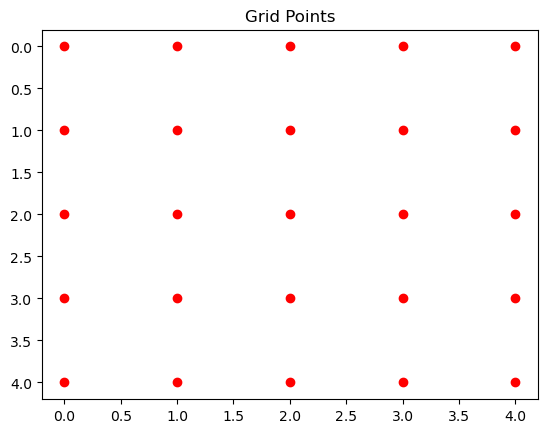
import matplotlib.pyplot as plt
import numpy as np
X,Y = np.mgrid[0:5, 0:5]
plt.scatter(X,Y, c='red', marker='o')  # y 是列索引(横轴),x 是行索引(纵轴)
plt.gca().invert_yaxis()  # 翻转 y 轴以符合图像坐标
plt.title("Grid Points")
plt.show()
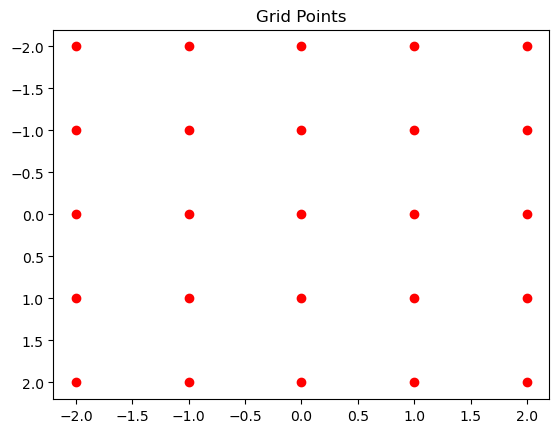
网格移动到坐标中心
import matplotlib.pyplot as plt
import numpy as np

size = 5
X,Y = np.mgrid[0:size, 0:size].astype(np.float64)
center = size/2
X+= 0.5 - center
Y+= 0.5 - center
plt.scatter(X,Y, c='red', marker='o')  # y 是列索引(横轴),x 是行索引(纵轴)
plt.gca().invert_yaxis()  # 翻转 y 轴以符合图像坐标
plt.title("Grid Points")
plt.show()
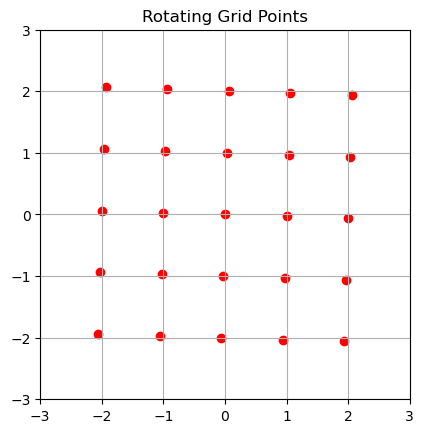
旋转坐标系
import matplotlib.pyplot as plt
import numpy as np
from matplotlib.animation import FuncAnimation
from IPython.display import HTML

# 生成初始网格
size = 5
X, Y = np.mgrid[0:size, 0:size].astype(np.float64)
center = size / 2
X += 0.5 - center
Y += 0.5 - center

# 旋转函数
def rot(X, Y, beta, clockWise=False):
    if clockWise:
        beta = -beta
    X_new = np.cos(beta) * X - np.sin(beta) * Y
    Y_new = np.sin(beta) * X + np.cos(beta) * Y
    return X_new, Y_new

# 初始化画布
fig, ax = plt.subplots()
scatter = ax.scatter([], [], c='red', marker='o')
ax.invert_yaxis()
ax.set_title("Rotating Grid Points")
ax.set_xlim(-3, 3)
ax.set_ylim(-3, 3)
ax.grid(True)
ax.set_aspect('equal')

# 动画更新函数
def update(frame):
    angle = frame * (np.pi / 2) / 50  # 从 0 到 90°,分 50 帧
    X_rot, Y_rot = rot(X, Y, angle)
    scatter.set_offsets(np.c_[X_rot.ravel(), Y_rot.ravel()])
    return scatter,

# 创建动画 ❓
ani = FuncAnimation(fig, update, frames=50, interval=50, blit=True)

# 显示动画为 HTML
HTML(ani.to_jshtml())
2.12 np.linalg 线性代数#
2.12.1 @#
import numpy as np

A = np.array([[1, 2], [3, 4]])
B = np.array([[5, 6], [7, 8]])

C = A @ B  # 矩阵乘法
print(C)
[[19 22]
 [43 50]]
2.12.2 decompositions#
A = np.random.randn(3, 3)
np.linalg.svd(A)
SVDResult(U=array([[-0.45996176,  0.84045837, -0.28646975],
       [-0.86138526, -0.50065539, -0.08578823],
       [-0.21552406,  0.20730151,  0.95424078]]), S=array([3.45699448, 1.54054236, 0.55365264]), Vh=array([[-0.85231143, -0.50914829,  0.11972159],
       [ 0.36198424, -0.40898848,  0.83767287],
       [ 0.37753496, -0.75729548, -0.53288921]]))
# 秩
np.linalg.matrix_rank(A)
3
2.12.3 eigen#
A = np.array([
    [1, 2, 3],
    [2, 3, 4],
    [3, 4, 5]
])
np.linalg.eig(A)
EigResult(eigenvalues=array([ 9.62347538e+00, -6.23475383e-01,  6.75139028e-17]), eigenvectors=array([[-0.38508979, -0.82767094,  0.40824829],
       [-0.55951021, -0.14241368, -0.81649658],
       [-0.73393063,  0.54284358,  0.40824829]]))
A = np.array([
    [1, 2, 3],
    [2, 1, 0],
    [3, 0, 1]
])
np.linalg.eigh(A) # 对称矩阵的特征值/向量计算,比eig更快
EighResult(eigenvalues=array([-2.60555128,  1.        ,  4.60555128]), eigenvectors=array([[-0.70710678,  0.        , -0.70710678],
       [ 0.39223227, -0.83205029, -0.39223227],
       [ 0.58834841,  0.5547002 , -0.58834841]]))
2.12.4 numbers#
A = np.array([
    [1, 2, 3],
    [2, 1, 0],
    [3, 0, 1]
])
# 矩阵范数
print('L1: ', np.linalg.norm(A, ord=1))
print('L2: ', np.linalg.norm(A, ord=2))
print('INF: ', np.linalg.norm(A, ord=np.inf))
L1:  6.0
L2:  4.605551275463989
INF:  6.0
A = np.eye(3)
np.linalg.det(A)
np.float64(1.0)
np.trace(A)
np.float64(3.0)
2.12.5 operations#
A = np.array([
    [1, 2, 3],
    [2, 3, 4],
    [3, 4, 5]
])
np.linalg.inv(A)
array([[ 1.35107989e+16, -2.70215978e+16,  1.35107989e+16],
       [-2.70215978e+16,  5.40431955e+16, -2.70215978e+16],
       [ 1.35107989e+16, -2.70215978e+16,  1.35107989e+16]])
np.vander([1, 2, 3], 3 + 1, increasing=True) # Vandermonde
array([[ 1,  1,  1,  1],
       [ 1,  2,  4,  8],
       [ 1,  3,  9, 27]])
2.12.6 diagnoal#
np.diagonal(A)
array([1, 3, 5])
2.12.7 err#
np.linalg.LinAlgError
numpy.linalg.LinAlgError
2.13 角度相关#
import numpy as np
np.arctan(2) # (1,2)向量夹角
np.float64(1.1071487177940904)
np.arctan2(1, 1) # (1,1)向量夹角
np.float64(0.7853981633974483)
np.degrees(np.arctan2(1, 1)) # 弧度转角度
np.float64(45.0)
np.radians(45) # 角度转弧度
np.float64(0.7853981633974483)
np.hypot(1,1) # 向量模长
np.float64(1.4142135623730951)
emath#
复数
np.emath.sqrt(-1)
1j
datime64#
np.datetime64('2005-02-25')
numpy.datetime64('2005-02-25')
exercises#
This is a collection of exercises that have been collected in the numpy mailing list, on stack overflow and in the numpy documentation. The goal of this collection is to offer a quick reference for both old and new users but also to provide a set of exercises for those who teach.
If you find an error or think you’ve a better way to solve some of them, feel free to open an issue at rougier/numpy-100.
File automatically generated. See the documentation to update questions/answers/hints programmatically.
Run the initialise.py module, then for each question you can query the
answer or an hint with hint(n) or answer(n) for n question number.
%run initialise.py
2. Print the numpy version and the configuration (★☆☆)#
np.show_config()
Build Dependencies:
  blas:
    detection method: pkgconfig
    found: true
    include directory: C:/Users/63517/miniconda3/envs/data-analysis/Library/include
    lib directory: C:/Users/63517/miniconda3/envs/data-analysis/Library/lib
    name: blas
    openblas configuration: unknown
    pc file directory: D:\bld\numpy_1707225570061\_h_env\Library\lib\pkgconfig
    version: 3.9.0
  lapack:
    detection method: internal
    found: true
    include directory: unknown
    lib directory: unknown
    name: dep2598594164480
    openblas configuration: unknown
    pc file directory: unknown
    version: 1.26.4
Compilers:
  c:
    commands: cl.exe
    linker: link
    name: msvc
    version: 19.29.30153
  c++:
    commands: cl.exe
    linker: link
    name: msvc
    version: 19.29.30153
  cython:
    commands: cython
    linker: cython
    name: cython
    version: 3.0.8
Machine Information:
  build:
    cpu: x86_64
    endian: little
    family: x86_64
    system: windows
  host:
    cpu: x86_64
    endian: little
    family: x86_64
    system: windows
Python Information:
  path: D:\bld\numpy_1707225570061\_h_env\python.exe
  version: '3.10'
SIMD Extensions:
  baseline:
  - SSE
  - SSE2
  - SSE3
  found:
  - SSSE3
  - SSE41
  - POPCNT
  - SSE42
  - AVX
  - F16C
  - FMA3
  - AVX2
  not found:
  - AVX512F
  - AVX512CD
  - AVX512_SKX
  - AVX512_CLX
  - AVX512_CNL
  - AVX512_ICL
4. How to find the memory size of any array (★☆☆)#
arr = np.zeros(10)
arr.nbytes
80
8. Reverse a vector (first element becomes last) (★☆☆)#
arr = np.arange(10, 30)
arr[::-1]
array([29, 28, 27, 26, 25, 24, 23, 22, 21, 20, 19, 18, 17, 16, 15, 14, 13,
       12, 11, 10])
9. Create a 3x3 matrix with values ranging from 0 to 8 (★☆☆)#
np.arange(9).reshape(3,3)
array([[0, 1, 2],
       [3, 4, 5],
       [6, 7, 8]])
10. Find indices of non-zero elements from [1,2,0,0,4,0] (★☆☆)#
arr = [1,2,0,0,4,0]
np.nonzero(arr)
(array([0, 1, 4], dtype=int64),)
15. Create a 2d array with 1 on the border and 0 inside (★☆☆)#
arr = np.ones((10, 10))
arr[1:-1, 1:-1] = 0
arr
array([[1., 1., 1., 1., 1., 1., 1., 1., 1., 1.],
       [1., 0., 0., 0., 0., 0., 0., 0., 0., 1.],
       [1., 0., 0., 0., 0., 0., 0., 0., 0., 1.],
       [1., 0., 0., 0., 0., 0., 0., 0., 0., 1.],
       [1., 0., 0., 0., 0., 0., 0., 0., 0., 1.],
       [1., 0., 0., 0., 0., 0., 0., 0., 0., 1.],
       [1., 0., 0., 0., 0., 0., 0., 0., 0., 1.],
       [1., 0., 0., 0., 0., 0., 0., 0., 0., 1.],
       [1., 0., 0., 0., 0., 0., 0., 0., 0., 1.],
       [1., 1., 1., 1., 1., 1., 1., 1., 1., 1.]])
16. How to add a border (filled with 0’s) around an existing array? (★☆☆)#
arr = np.ones((10, 10))
arr = np.pad(arr, pad_width=1)
arr
array([[0., 0., 0., 0., 0., 0., 0., 0., 0., 0., 0., 0.],
       [0., 1., 1., 1., 1., 1., 1., 1., 1., 1., 1., 0.],
       [0., 1., 1., 1., 1., 1., 1., 1., 1., 1., 1., 0.],
       [0., 1., 1., 1., 1., 1., 1., 1., 1., 1., 1., 0.],
       [0., 1., 1., 1., 1., 1., 1., 1., 1., 1., 1., 0.],
       [0., 1., 1., 1., 1., 1., 1., 1., 1., 1., 1., 0.],
       [0., 1., 1., 1., 1., 1., 1., 1., 1., 1., 1., 0.],
       [0., 1., 1., 1., 1., 1., 1., 1., 1., 1., 1., 0.],
       [0., 1., 1., 1., 1., 1., 1., 1., 1., 1., 1., 0.],
       [0., 1., 1., 1., 1., 1., 1., 1., 1., 1., 1., 0.],
       [0., 1., 1., 1., 1., 1., 1., 1., 1., 1., 1., 0.],
       [0., 0., 0., 0., 0., 0., 0., 0., 0., 0., 0., 0.]])
17. What is the result of the following expression? (★☆☆)#
0 * np.nan
np.nan == np.nan
np.inf > np.nan
np.nan - np.nan
np.nan in set([np.nan])
0.3 == 3 * 0.1
0.3 == 3 * 0.1
False
Warning
python浮点数表示和存储是不一致的。 所以浮点数一定用numpy
3*0.1
0.30000000000000004
18. Create a 5x5 matrix with values 1,2,3,4 just below the diagonal (★☆☆)#
np.diag(1+np.arange(4))
array([[1, 0, 0, 0],
       [0, 2, 0, 0],
       [0, 0, 3, 0],
       [0, 0, 0, 4]])
19. Create a 8x8 matrix and fill it with a checkerboard pattern (★☆☆)#
arr = np.zeros((8,8))
arr[1::2, ::2] = 1
arr[::2, 1::2] = 1
arr
array([[0., 1., 0., 1., 0., 1., 0., 1.],
       [1., 0., 1., 0., 1., 0., 1., 0.],
       [0., 1., 0., 1., 0., 1., 0., 1.],
       [1., 0., 1., 0., 1., 0., 1., 0.],
       [0., 1., 0., 1., 0., 1., 0., 1.],
       [1., 0., 1., 0., 1., 0., 1., 0.],
       [0., 1., 0., 1., 0., 1., 0., 1.],
       [1., 0., 1., 0., 1., 0., 1., 0.]])
20. Consider a (6,7,8) shape array, what is the index (x,y,z) of the 100th element? (★☆☆)#
shape = (6,7,8)
np.unravel_index(99, shape)
(1, 5, 3)
unravel_index 计算多维数组 线性索引对应坐标
21. Create a checkerboard 8x8 matrix using the tile function (★☆☆)#
arr = [[0,1],[1,0]]
np.tile(arr, [4, 4])
array([[0, 1, 0, 1, 0, 1, 0, 1],
       [1, 0, 1, 0, 1, 0, 1, 0],
       [0, 1, 0, 1, 0, 1, 0, 1],
       [1, 0, 1, 0, 1, 0, 1, 0],
       [0, 1, 0, 1, 0, 1, 0, 1],
       [1, 0, 1, 0, 1, 0, 1, 0],
       [0, 1, 0, 1, 0, 1, 0, 1],
       [1, 0, 1, 0, 1, 0, 1, 0]])
22. Normalize a 5x5 random matrix (★☆☆)#
np.random.normal(size=(5,5))
array([[ 0.40015721,  0.97873798,  2.2408932 ,  1.86755799, -0.97727788],
       [ 0.95008842, -0.15135721, -0.10321885,  0.4105985 ,  0.14404357],
       [ 1.45427351,  0.76103773,  0.12167502,  0.44386323,  0.33367433],
       [ 1.49407907, -0.20515826,  0.3130677 , -0.85409574, -2.55298982],
       [ 0.6536186 ,  0.8644362 , -0.74216502,  2.26975462, -1.45436567]])
23. Create a custom dtype that describes a color as four unsigned bytes (RGBA) (★☆☆)#
np.dtype([
    ('g', np.ubyte),
    ('g', np.ubyte),
    ('b', np.ubyte),
    ('a', np.ubyte),
])
dtype([('R', 'u1'), ('g', 'u1'), ('b', 'u1'), ('a', 'u1')])
24. Multiply a 5x3 matrix by a 3x2 matrix (real matrix product) (★☆☆)#
np.random.randn(5,3) @ np.random.randn(3, 2)
array([[-0.32395007, -0.51198854],
       [ 1.08643489,  0.45519865],
       [ 1.21850698,  0.89708761],
       [ 0.0385115 , -0.22753733],
       [-0.348692  , -0.50089328]])
25. Given a 1D array, negate all elements which are between 3 and 8, in place. (★☆☆)#
z = np.arange(11)
z[(z>3) & (z<8)] = -1
z
array([ 0, 1, 2, 3, -1, -1, -1, -1, 8, 9, 10])
26. What is the output of the following script? (★☆☆)#
# Author: Jake VanderPlas

print(sum(range(5),-1))
from numpy import *
print(sum(range(5),-1))
print(sum(range(5),-1))
from numpy import *
print(sum(range(5),-1))
9
10
27. Consider an integer vector Z, which of these expressions are legal? (★☆☆)#
Z**Z
2 << Z >> 2
Z <- Z
1j*Z
Z/1/1
Z<Z>Z
arr = np.arange(5)
28. What are the result of the following expressions? (★☆☆)#
np.array(0) / np.array(0)
np.array(0) // np.array(0)
np.array([np.nan]).astype(int).astype(float)
np.array([np.nan]).astype(int).astype(float)
C:\Users\63517\AppData\Local\Temp\ipykernel_19948\699728972.py:1: RuntimeWarning: invalid value encountered in cast
  np.array([np.nan]).astype(int).astype(float)
array([-2.14748365e+09])
29. How to round away from zero a float array ? (★☆☆)#
z = np.random.uniform(-10, 10 ,10)
z
array([-1.05749243,  6.92817345,  3.98958551, -4.05126098,  6.27595639,
       -2.06988518,  7.62206394,  1.62545745,  7.63470724,  3.8506318 ])
np.where(z>0, np.ceil(z), np.floor(z))
array([-2., 7., 4., -5., 7., -3., 8., 2., 8., 4.])
30. How to find common values between two arrays? (★☆☆)#
np.intersect1d(np.arange(10), np.arange(3))
array([0, 1, 2])
32. Is the following expressions true? (★☆☆)#
np.sqrt(-1) == np.emath.sqrt(-1)
np.sqrt(-1)
C:\Users\63517\AppData\Local\Temp\ipykernel_19948\3438155168.py:1: RuntimeWarning: invalid value encountered in sqrt
  np.sqrt(-1)
nan
np.emath.sqrt(-1)
1j
33. How to get the dates of yesterday, today and tomorrow? (★☆☆)#
34. How to get all the dates corresponding to the month of July 2016? (★★☆)#
35. How to compute ((A+B)*(-A/2)) in place (without copy)? (★★☆)#
36. Extract the integer part of a random array of positive numbers using 4 different methods (★★☆)#
37. Create a 5x5 matrix with row values ranging from 0 to 4 (★★☆)#
38. Consider a generator function that generates 10 integers and use it to build an array (★☆☆)#
39. Create a vector of size 10 with values ranging from 0 to 1, both excluded (★★☆)#
40. Create a random vector of size 10 and sort it (★★☆)#
41. How to sum a small array faster than np.sum? (★★☆)#
42. Consider two random arrays A and B, check if they are equal (★★☆)#
43. Make an array immutable (read-only) (★★☆)#
44. Consider a random 10x2 matrix representing cartesian coordinates, convert them to polar coordinates (★★☆)#
45. Create random vector of size 10 and replace the maximum value by 0 (★★☆)#
46. Create a structured array with x and y coordinates covering the [0,1]x[0,1] area (★★☆)#
47. Given two arrays, X and Y, construct the Cauchy matrix C (Cij =1/(xi - yj)) (★★☆)#
48. Print the minimum and maximum representable values for each numpy scalar type (★★☆)#
49. How to print all the values of an array? (★★☆)#
50. How to find the closest value (to a given scalar) in a vector? (★★☆)#
51. Create a structured array representing a position (x,y) and a color (r,g,b) (★★☆)#
52. Consider a random vector with shape (100,2) representing coordinates, find point by point distances (★★☆)#
53. How to convert a float (32 bits) array into an integer (32 bits) array in place?#
54. How to read the following file? (★★☆)#
1, 2, 3, 4, 5
6,  ,  , 7, 8
 ,  , 9,10,11
55. What is the equivalent of enumerate for numpy arrays? (★★☆)#
56. Generate a generic 2D Gaussian-like array (★★☆)#
57. How to randomly place p elements in a 2D array? (★★☆)#
58. Subtract the mean of each row of a matrix (★★☆)#
59. How to sort an array by the nth column? (★★☆)#
60. How to tell if a given 2D array has null columns? (★★☆)#
61. Find the nearest value from a given value in an array (★★☆)#
62. Considering two arrays with shape (1,3) and (3,1), how to compute their sum using an iterator? (★★☆)#
63. Create an array class that has a name attribute (★★☆)#
64. Consider a given vector, how to add 1 to each element indexed by a second vector (be careful with repeated indices)? (★★★)#
65. How to accumulate elements of a vector (X) to an array (F) based on an index list (I)? (★★★)#
66. Considering a (w,h,3) image of (dtype=ubyte), compute the number of unique colors (★★☆)#
67. Considering a four dimensions array, how to get sum over the last two axis at once? (★★★)#
68. Considering a one-dimensional vector D, how to compute means of subsets of D using a vector S of same size describing subset indices? (★★★)#
69. How to get the diagonal of a dot product? (★★★)#
70. Consider the vector [1, 2, 3, 4, 5], how to build a new vector with 3 consecutive zeros interleaved between each value? (★★★)#
71. Consider an array of dimension (5,5,3), how to multiply it by an array with dimensions (5,5)? (★★★)#
72. How to swap two rows of an array? (★★★)#
74. Given a sorted array C that corresponds to a bincount, how to produce an array A such that np.bincount(A) == C? (★★★)#
75. How to compute averages using a sliding window over an array? (★★★)#
76. Consider a one-dimensional array Z, build a two-dimensional array whose first row is (Z[0],Z[1],Z[2]) and each subsequent row is shifted by 1 (last row should be (Z[-3],Z[-2],Z[-1]) (★★★)#
77. How to negate a boolean, or to change the sign of a float inplace? (★★★)#
78. Consider 2 sets of points P0,P1 describing lines (2d) and a point p, how to compute distance from p to each line i (P0[i],P1[i])? (★★★)#
79. Consider 2 sets of points P0,P1 describing lines (2d) and a set of points P, how to compute distance from each point j (P[j]) to each line i (P0[i],P1[i])? (★★★)#
80. Consider an arbitrary array, write a function that extracts a subpart with a fixed shape and centered on a given element (pad with a fill value when necessary) (★★★)#
81. Consider an array Z = [1,2,3,4,5,6,7,8,9,10,11,12,13,14], how to generate an array R = [[1,2,3,4], [2,3,4,5], [3,4,5,6], …, [11,12,13,14]]? (★★★)#
82. Compute a matrix rank (★★★)#
83. How to find the most frequent value in an array?#
84. Extract all the contiguous 3x3 blocks from a random 10x10 matrix (★★★)#
85. Create a 2D array subclass such that Z[i,j] == Z[j,i] (★★★)#
86. Consider a set of p matrices with shape (n,n) and a set of p vectors with shape (n,1). How to compute the sum of of the p matrix products at once? (result has shape (n,1)) (★★★)#
87. Consider a 16x16 array, how to get the block-sum (block size is 4x4)? (★★★)#
88. How to implement the Game of Life using numpy arrays? (★★★)#
89. How to get the n largest values of an array (★★★)#
90. Given an arbitrary number of vectors, build the cartesian product (every combination of every item) (★★★)#
91. How to create a record array from a regular array? (★★★)#
92. Consider a large vector Z, compute Z to the power of 3 using 3 different methods (★★★)#
93. Consider two arrays A and B of shape (8,3) and (2,2). How to find rows of A that contain elements of each row of B regardless of the order of the elements in B? (★★★)#
94. Considering a 10x3 matrix, extract rows with unequal values (e.g. [2,2,3]) (★★★)#
95. Convert a vector of ints into a matrix binary representation (★★★)#
96. Given a two dimensional array, how to extract unique rows? (★★★)#
97. Considering 2 vectors A & B, write the einsum equivalent of inner, outer, sum, and mul function (★★★)#
98. Considering a path described by two vectors (X,Y), how to sample it using equidistant samples (★★★)?#
99. Given an integer n and a 2D array X, select from X the rows which can be interpreted as draws from a multinomial distribution with n degrees, i.e., the rows which only contain integers and which sum to n. (★★★)#
100. Compute bootstrapped 95% confidence intervals for the mean of a 1D array X (i.e., resample the elements of an array with replacement N times, compute the mean of each sample, and then compute percentiles over the means). (★★★)#
1. 计算0的比例#
import numpy as np
a = [1.0, 0, 0.2 ,0.3, 0]
d = np.array(a)
np.mean(d==0)
np.float64(0.4)
2. 计算数组标准差时候忽略NaN#
a = np.array([1, 1.2, np.nan])
print(np.std(a))
print(np.nanstd(a))
print(a[~np.isnan(a)].std())
3. 获取二维数组行列数#
a = np.random.random(size= (10, 3))
print(a.size)
print(a.shape)
print(len(a))
# print(a.dim) # error
30
(10, 3)
10
4. 代码输出#
print(np.floor(3.7)) # 返回的是float而不是int
3.0
print(np.radians(180))
print(np.deg2rad(180))
print(np.angle(-np.pi)) # 返回 -pi, pi 的实数表达
3.141592653589793
3.141592653589793
3.141592653589793
print(np.round(2.567, 2))
2.57
print(np.log10(100))
2.0
print(np.sqrt(np.square(-5)))
5.0
a = np.array([1, 2, 3])
np.diff(a)
array([1, 1])
print(np.sign(-3.14))
-1.0
5. 数组堆叠#
a = np.random.random(size = (3, 3))
b = np.random.random(size = a.shape)
print('垂直堆叠等价!')
print(np.concatenate((a, b)))
print(np.concatenate((a, b), axis = 0))
print(np.vstack((a, b)))
print(np.row_stack((a, b)))
垂直堆叠等价!
[[0.0641475  0.69247212 0.56660145]
 [0.26538949 0.52324805 0.09394051]
 [0.5759465  0.9292962  0.31856895]
 [0.66741038 0.13179786 0.7163272 ]
 [0.28940609 0.18319136 0.58651293]
 [0.02010755 0.82894003 0.00469548]]
[[0.0641475  0.69247212 0.56660145]
 [0.26538949 0.52324805 0.09394051]
 [0.5759465  0.9292962  0.31856895]
 [0.66741038 0.13179786 0.7163272 ]
 [0.28940609 0.18319136 0.58651293]
 [0.02010755 0.82894003 0.00469548]]
[[0.0641475  0.69247212 0.56660145]
 [0.26538949 0.52324805 0.09394051]
 [0.5759465  0.9292962  0.31856895]
 [0.66741038 0.13179786 0.7163272 ]
 [0.28940609 0.18319136 0.58651293]
 [0.02010755 0.82894003 0.00469548]]
[[0.0641475  0.69247212 0.56660145]
 [0.26538949 0.52324805 0.09394051]
 [0.5759465  0.9292962  0.31856895]
 [0.66741038 0.13179786 0.7163272 ]
 [0.28940609 0.18319136 0.58651293]
 [0.02010755 0.82894003 0.00469548]]
/tmp/ipykernel_563/1015955732.py:5: DeprecationWarning: `row_stack` alias is deprecated. Use `np.vstack` directly.
  print(np.row_stack((a, b)))
6. 代码功能#
a = np.array([1, 3, 1])
np.unique(a)
print('np.unique 代码功能:去重并且排序', np.unique(a))
np.unique 代码功能:去重并且排序 [1 3]
7. 向量点积#
a = np.linspace(0, 1, 5)
b = np.linspace(0, 1, 5)
print(a, b)
print(a.dot(b))
print(np.dot(a, b))
print(a@b)
[0.   0.25 0.5  0.75 1.  ] [0.   0.25 0.5  0.75 1.  ]
1.875
1.875
1.875
8. 随机数#
print('生成5个随机浮点数数组。[0,1]')
print(np.random.sample(5))
print(np.random.random(5))
print(np.random.rand(5))
生成5个随机浮点数数组。[0,1]
[0.22431703 0.09784448 0.86219152 0.97291949 0.96083466]
[0.9065555  0.77404733 0.33314515 0.08110139 0.40724117]
[0.23223414 0.13248763 0.05342718 0.72559436 0.01142746]
print('生成几个区间内随机数')
print([np.random.uniform(-1, 3) for i in range(5)])
print([np.random.randint(5) for _ in range(5)])
生成几个区间内随机数
[-0.01853116058862092, 0.6821578667203938, 1.2294751652956677, 2.442204695315175, 1.908177050845313]
[1, 4, 4, 2, 0]
9.数组内计算#
print('数组的最大值索引')
a = np.random.rand(5)
print(a)
print(np.argmax(a))
print(a.argmax())
数组的最大值索引
[0.24082878 0.10029394 0.01642963 0.92952932 0.66991655]
3
3
print('数组绝对值')
a = [np.random.uniform(-1, 1) for _ in range(4)]
print(a)
print(np.abs(a))
print(np.absolute(a))
数组绝对值
[0.794140209206287, -0.7578802407978291, -0.5169086270120735, -0.5434727801992574]
[0.79414021 0.75788024 0.51690863 0.54347278]
[0.79414021 0.75788024 0.51690863 0.54347278]
print('exp')
a = [np.random.uniform(-1, 1) for _ in range(4)]
print(np.exp(a))
print(np.power(np.e, a))
exp
[1.00789825 0.66530132 2.16392681 0.7435949 ]
[1.00789825 0.66530132 2.16392681 0.7435949 ]
[1.90655714e-06 nan 4.94762469e-01 nan]
/tmp/ipykernel_563/2254085650.py:5: RuntimeWarning: invalid value encountered in power
print(np.array(a) ** np.e)
a = np.random.random(size=(3,3))
print('行列式')
print(a)
print(np.linalg.det(a))
#print(np.det(a)) # error!!!
行列式
[[0.70791746 0.70907211 0.61174841]
[0.67190702 0.44751587 0.69607717]
[0.37832614 0.10003205 0.96025678]]
-0.07830073927928352
10. 数组类型转换#
print('整数数组=>浮点型')
a = np.array([1, 2, -1])
print(a)
print(a.astype(float))
print(a.astype(np.float64))
print(np.float64(a))
整数数组=>浮点型
[ 1 2 -1]
[ 1. 2. -1.]
[ 1. 2. -1.]
[ 1. 2. -1.]
print('bool数组=>整型')
a = np.array([True, False])
print(a)
print(a.astype(int))
print(a * 1)
print(np.int_(a))
bool数组=>整型
[ True False]
[1 0]
[1 0]
[1 0]
11. 数组的累积#
a = np.array([1, 2, 3])
print(np.cumprod(a))
print(a.cumprod())
[1 2 6]
[1 2 6]
12. 指定形状矩阵#
print(np.diag([1, 2, 3]))
print(np.eye(3)) # 单位矩阵
print(np.diagflat([1, 2, 3]))
[[1 0 0]
[0 2 0]
[0 0 3]]
[[1. 0. 0.]
[0. 1. 0.]
[0. 0. 1.]]
[[1 0 0]
[0 2 0]
[0 0 3]]
13. 矩阵间计算#
a = [np.random.uniform(1,2) for _ in range(5)]
b = [np.random.uniform(1,2) for _ in range(5)]
a = np.array(a)
b = np.array(b)
print(a * b)
print(np.multiply(a,b))
[1.55217351 3.3946128 2.34842722 1.34907623 1.87644318]
[1.55217351 3.3946128 2.34842722 1.34907623 1.87644318]
14. 数组转换#
print('二维数组展开到一维')
a = np.random.random(size=(3, 3))
print(a.flatten())
print(a.ravel())
print(a.reshape(-1))
二维数组展开到一维
[0.97208251 0.83381823 0.91479066 0.66728484 0.44066609 0.68509199
0.64859831 0.02910001 0.91953144]
[0.97208251 0.83381823 0.91479066 0.66728484 0.44066609 0.68509199
0.64859831 0.02910001 0.91953144]
[0.97208251 0.83381823 0.91479066 0.66728484 0.44066609 0.68509199
0.64859831 0.02910001 0.91953144]